

Signup questions are where you collect useful attendee details: allergies, meal choices, or whether someone wants a follow-up. Until now, those answers stayed in Registrations, so acting on them meant exporting to a CSV and manually building lists.
People Lists can now filter by answers to your signup questions. Pick a signup, choose a question, and set the answer you’re looking for. Then email, report on, or automate from that list.
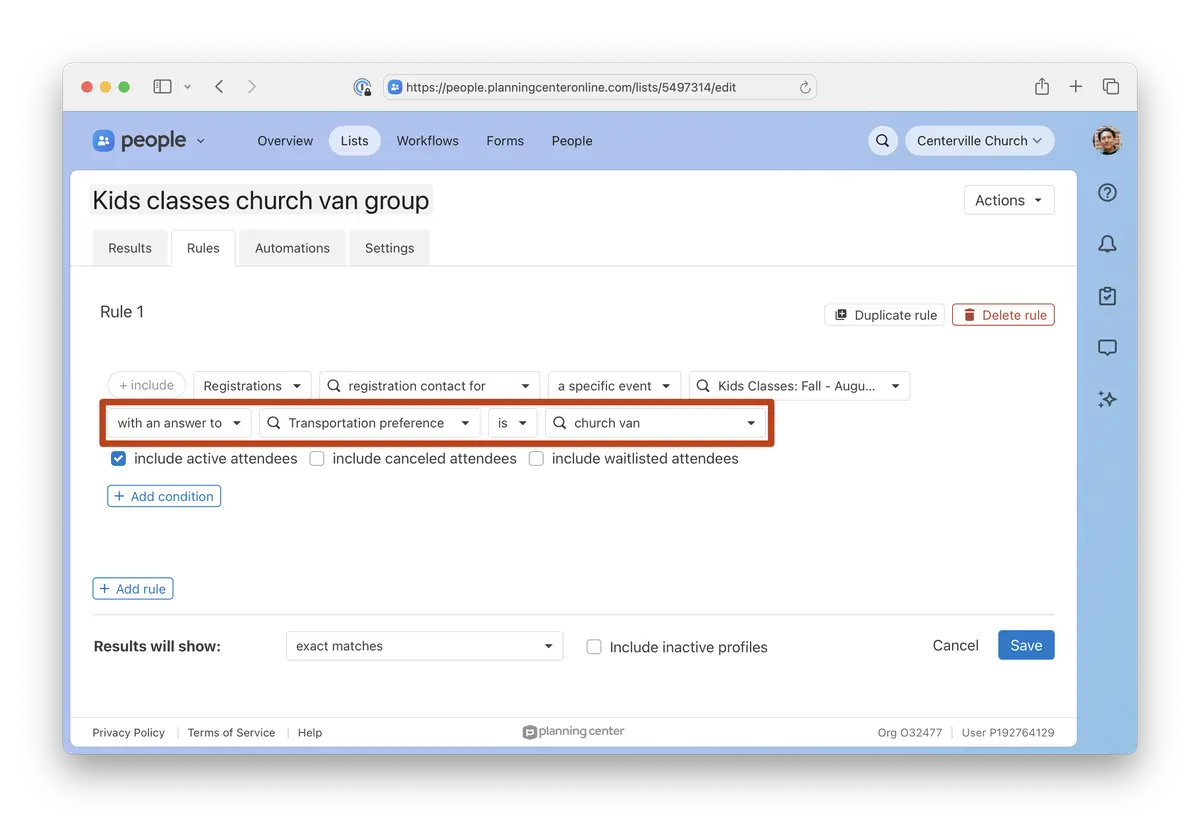
Choose who lands on the list
Named attendee for returns the attendees whose answers match.
Registration contact for returns the people who registered them, which is handy when you need to reach parents instead of kids.
Why it matters
With signup answers available in People Lists conditions, you can find exactly the people you need and take the next step from there. For example:
Email the parents of every student who needs transportation.
Hand the kitchen team a list of everyone who needs a vegetarian meal.
Add guests who checked “I’d like to learn more” to a follow-up workflow.
Combine answers with conditions from other products, like Groups or Check-Ins.
Where to find it
In People, go to Lists and add a Registrations condition. Pick a specific signup, then select with an answer to.
💙 The People and Registrations Teams