

When we introduced custom email senders, workflow cards weren't part of that first release, and it was one of the first follow-up requests we heard. Many workflow emails, like a welcome note after someone's first visit or an invitation to a newcomer class, should come from a pastor or a ministry, not from the staff member or volunteer working the card. To workaround this, your best option was to leave the workflow and send from the person's profile or a list, which meant the email never showed up in the card's history.
Workflow card emails now have a "From" option for any custom sender you have access to:
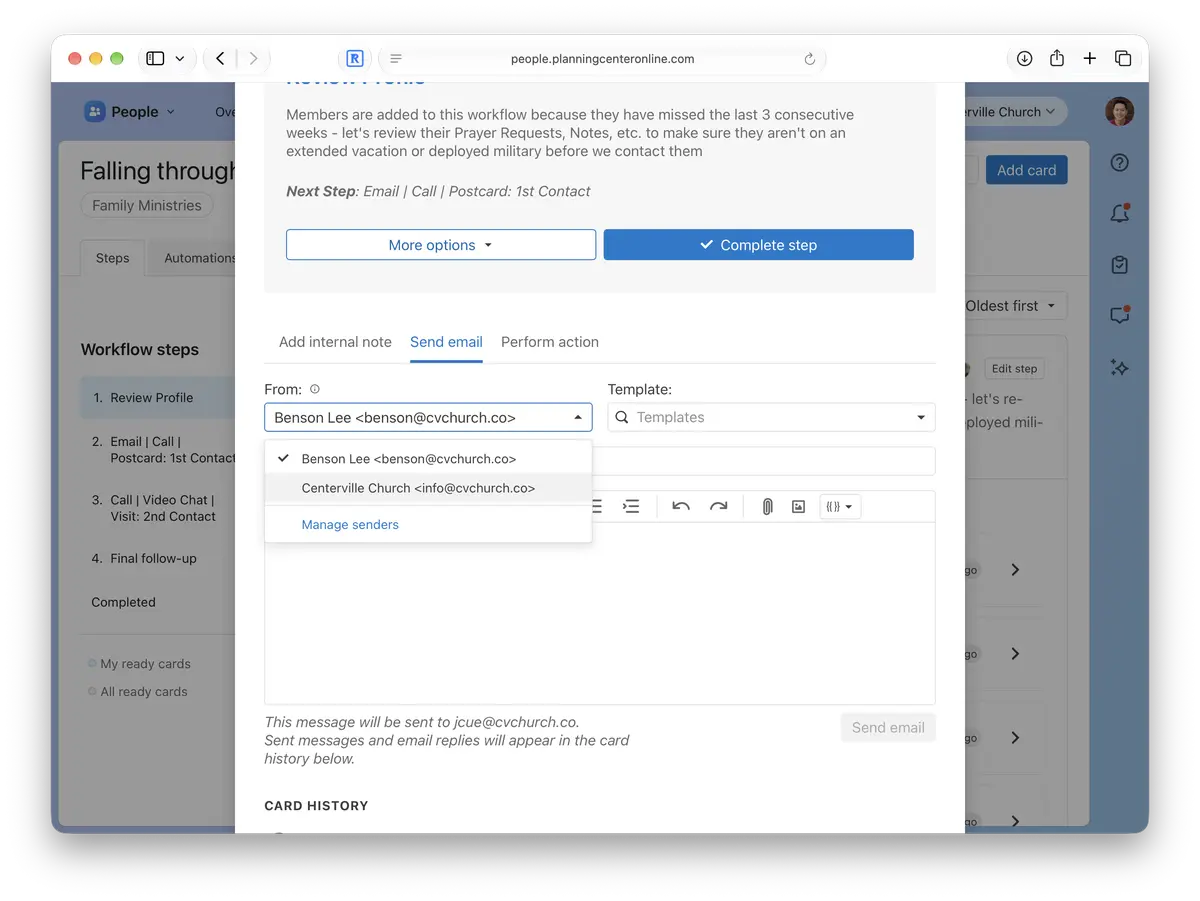
How it works
Senders you have permission to use: The "From" dropdown only lists custom senders you've been given access to. If one you need isn't there, ask someone with Manager permissions in People to add you.
Single cards and bulk emails: Choose a sender when emailing from a workflow card or when emailing selected cards from the workflow page.
Recipients see the sender's name: The email shows the custom sender's name, like "Pastor Mike" or "Connections Team."
Replies go to the sender and the card: Replies go to the custom sender's email address and still show up in the card's history. When you send as a custom sender, replies go there instead of to your own inbox.
We hope this saves you a few trips out of your workflows!
💙 The People Team,
Usborn, Shawn, Shane, Saryn, Nick, Kody, James, Gabi, Fred, Dave, and Benson