

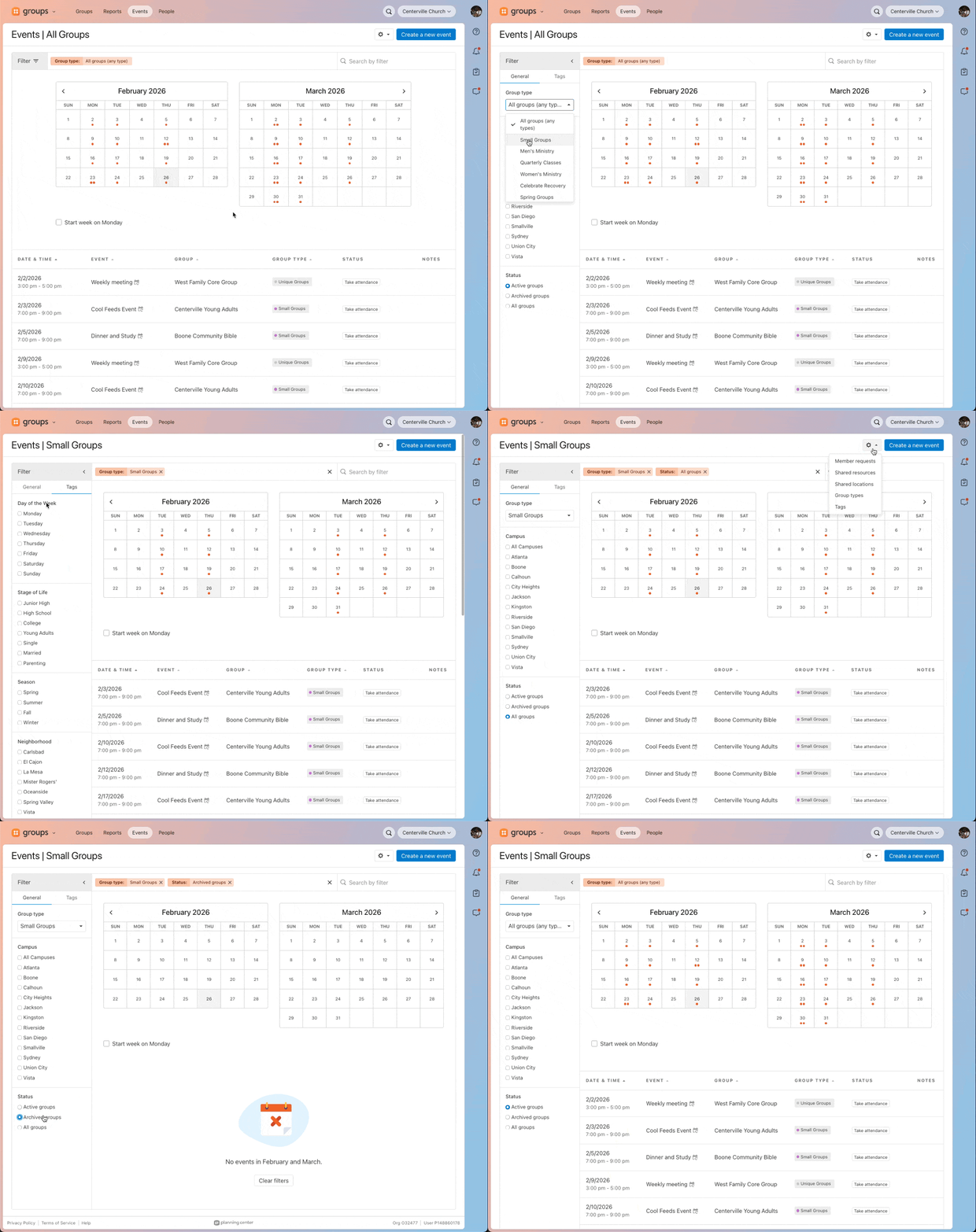
We’ve improved the filtering experience on the events page to better match the Groups list page, improve performance, and make filters easier to use on smaller mobile and tablet screens.
The Group type dropdown is now in the Filter sidebar.
Campuses and Status are now separate from Tags. Previously, they lived in the same dropdown. Now they live in two sidebar tabs: General and Tags, matching the Groups list sidebar.
There’s a new Status option: All groups, which matches the Groups list options.
The Manage Tags link has been removed from the tag options. Tag management is still available from the utility dropdown in the top-right of the page header, by clicking Tags.
Filter options no longer narrow based on the selected group type. All tags and campuses are always available in the sidebar, matching the behavior of the Groups list and People page.
There’s now a Clear filters button on the empty state when filtering, to help you reset if you’ve filtered down too far.
Why the change?
We want filtering across Groups to feel consistent and easy to use, so you do not have to learn new patterns as you move between pages. We also wanted the filtering experience to work better on smaller screens, especially phones and tablets.
🧡 Team Groups