:quality(75))
:quality(75))
It's December. Which means you're not just coordinating this year's candlelight Christmas Eve services—you're already sketching plans for early 2026. Youth lock-ins. Easter services. Summer camps. VBS. All-staff retreats. The list goes on.
You’ve probably been doing this work with one big calendar and a lot of tags. It works…sort of. But finding your team's events means filtering through everyone else's. And when you need to see how your events fit into the bigger church rhythm? You're toggling tags on and off, trying to remember which combination shows what you need.
What if each team just had their own calendar?
A Christmas miracle: Multiple calendars are here
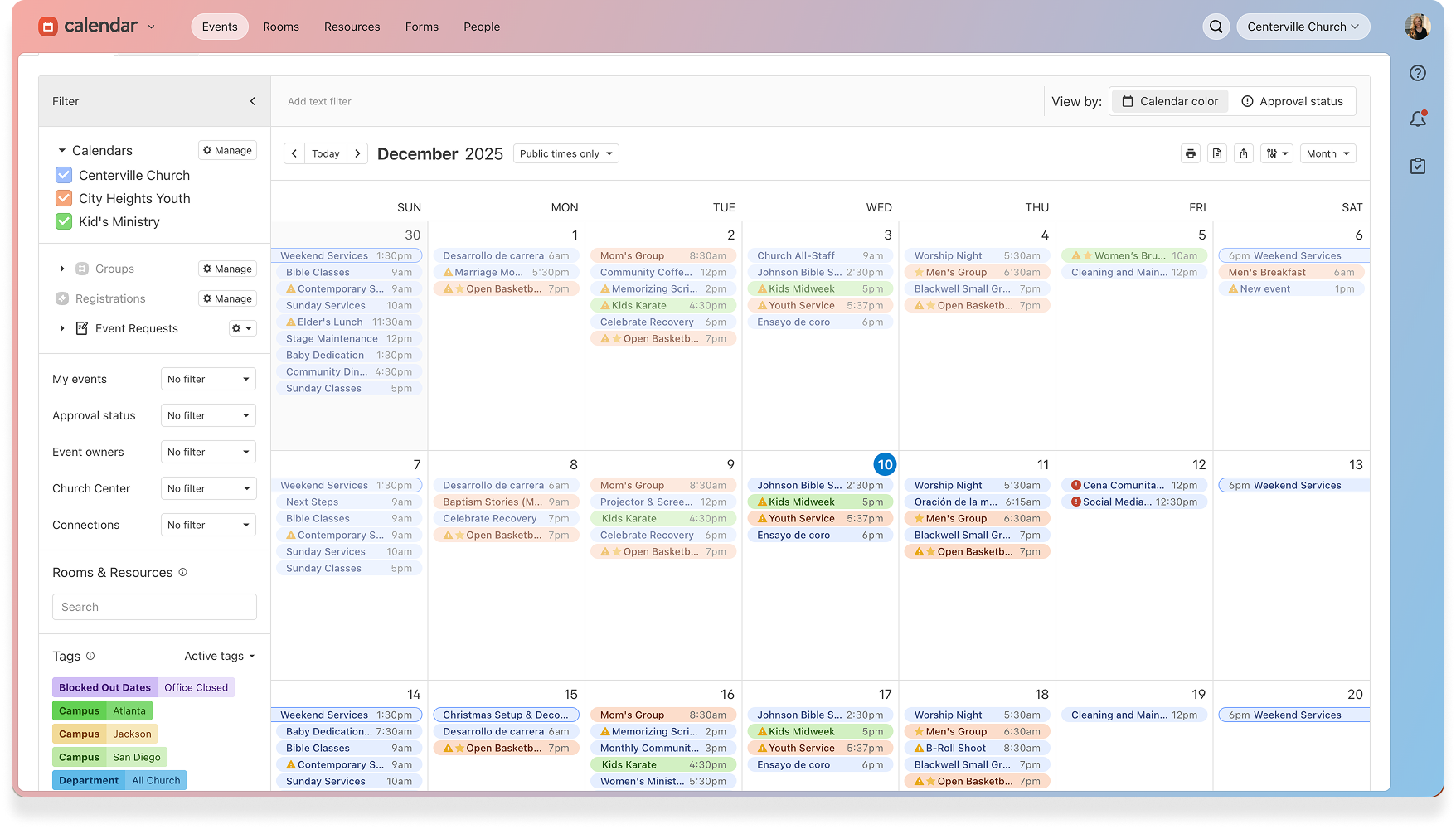
Calendar now supports multiple calendars, giving every team a clear home for the events they own! Create dedicated calendars for ministries, campuses, or facilities. Color-code them for fast scanning, and switch views without losing the big picture.
Your Google, Apple, or Outlook calendar has worked this way for a while, and we thought your Planning Center calendar should work this way too. There's just something different about having multiple calendars in your Planning Center calendar where all of your ministry planning is happening. Because this isn't just your personal schedule, it's your church's entire rhythm. And now every team can see their part in it more clearly.
 Calendars vs. tags: What’s the difference?
First, let's clarify how calendars and tags work together, because they serve different purposes.
Calendars give ministry teams a single, central, and shared view of events their ministry is responsible for. Those ministry-specific events belong to their corresponding ministry. You might create calendars like:
Children's Ministry
Youth Ministry
Staff
Facilities/Maintenance
Tags let you organize events by their common characteristics. An event can have as many tags as you need, and you can even use multiple tags from the same group. Tag groups can be marked as required. You can use tags for things like:
Event type, like worship service, community activity, service opportunity, or meeting
Event needs, like HVAC required, AV equipment, or specific paperwork
Language, like English, Spanish, Korean, or bilingual
Campus
Here’s an example of what that could look like practically: Your youth ministry summer camp would belong to the Youth Ministry calendar, and might be tagged as an overnight event, registration required, and parental forms required. The calendar marks ownership, while the tags mark attributes.
What this means for your ministry team
If you equip ministry leaders
Give each ministry team their own calendar and watch what happens. Youth leaders can pull up their calendar and see only their events without having to sift through stuff that doesn’t apply to them. They can plan their quarter, spot gaps in programming, and know at a glance what's coming.
And when someone asks, "Who's in charge of that event?" the calendar answers the question. Ownership becomes clear.
If you manage multiple campuses
Create a calendar for each location and have your multi-site coordination get much simpler. Need to see what's happening at your downtown campus next month? Just switch to that calendar view. Curious if any campuses are scheduling conflicting events? Toggle between campus calendars to compare them.
It’s kind of the planning dream, right?
If you oversee facilities
Make a central calendar for facilities-specific events, like building maintenance, arranging the sanctuary, or landscaping needs. You can visualize space utilization and allocate resources more strategically.
Getting started with multiple calendars
When you open Calendar, you'll see that we've already created a new calendar using your organization name. All of your existing events live there, and you can reassign them to new calendars whenever you're ready.
And if you've spent months (or years) building a thoughtful tagging system, don’t worry! That work isn’t lost. You can bulk-transfer events from specific tags into new calendars. Your Children's Ministry tag can become a Children's Ministry calendar in just a few clicks.
Your events will still appear in the same products they did before, and your room reservations and permissions still work too. The only difference now is how you organize and view everything in Calendar.
It’s still one system—just easier to navigate.
Multiple calendars are available now in… Calendar. So log in now and give every team their own home!