

Building lists can feel like a puzzle—trying to figure out which conditions exist, which product they’re associated with, and how to combine them to find exactly who you're looking for.
Or maybe you're the go-to person when admins need help creating lists because they're intimidated by all the options.
Now you and your team can skip all that and just describe what you need in plain English.
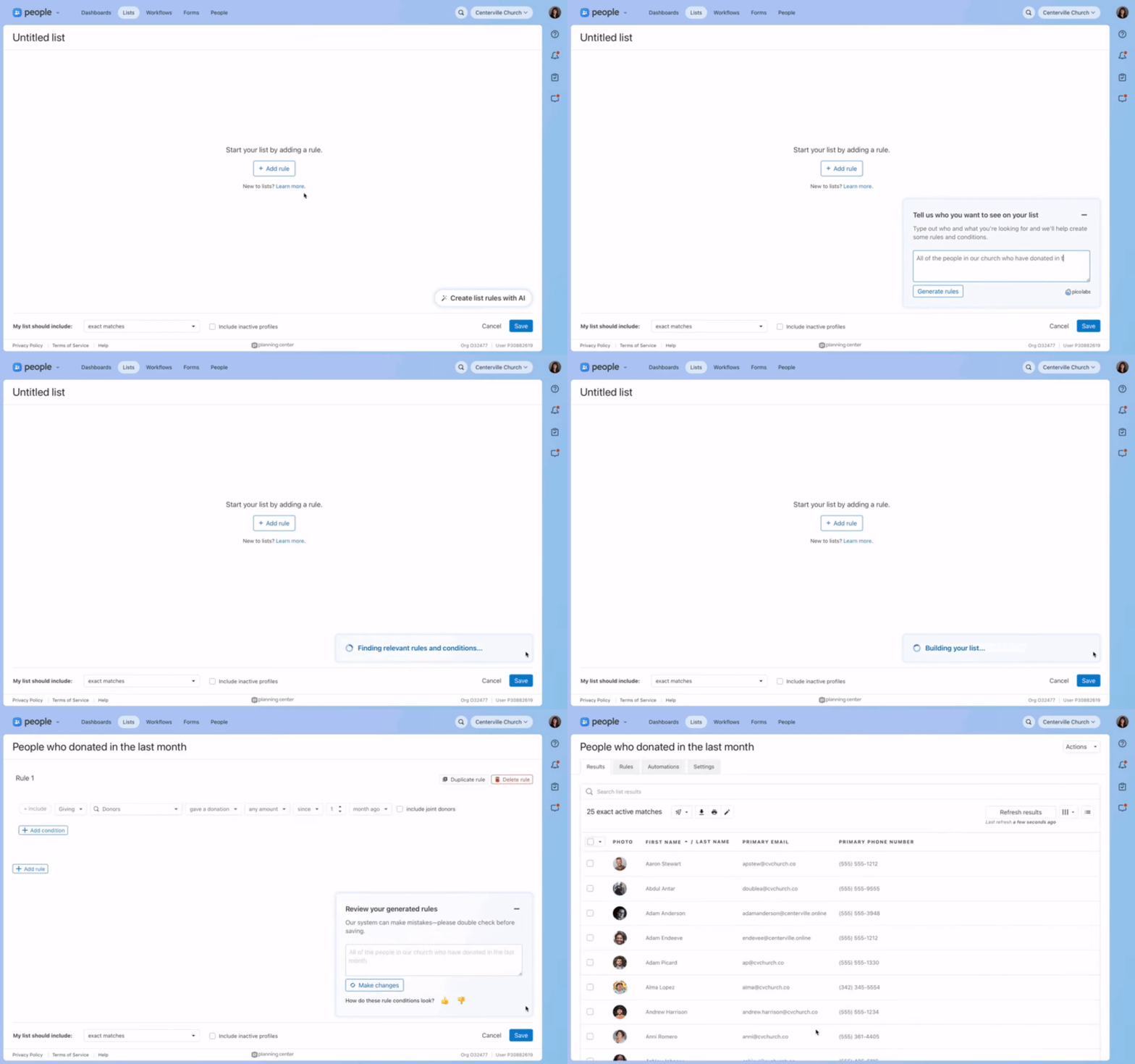
Instead of clicking through products, conditions, and rules, type something like "everyone who is a member but isn’t part of a small group," "volunteers on any team in any service without a background check," or “people who have had any activity in the last 90 days,” and our AI-powered list builder translates your description into the right conditions and rules.
 For power users, this reduces the tedium of building complex queries by hand. For less technical admins, this makes building lists more accessible and builds understanding of what list conditions are available.
Type who you’re looking for, we’ll build you a list
When creating a new list, you'll see a new option to describe your list in your own words. Type your description, and we'll generate the matching conditions. You can edit your prompt and regenerate your rules, provide feedback on accuracy, or manually edit your rules anytime.
The list builder understands queries across multiple products and can reference your organization-specific content like custom fields, group types, and team names.
Expect the results to get you close, but not all the way or all the time
There are times when we don't have the list conditions to match what you're describing. When that happens, we'll let you know—either by showing an error or by providing our closest attempt with a note that we couldn't fully match your request.
This helps you know whether the results are exactly what you asked for or if you'll need to adjust your approach.
This is a work in progress, and we need your feedback
We're releasing this under our PicoLabs brand to indicate that this feature is still a work in progress.
We're still refining things based on real-world usage. Using the 👍🏼 and 👎🏼 feedback rating helps us improve—you'll see a quick rating option after each list generation.
:quality(75))
Check out this blog post for more information on how we built this feature, why we built it the way we did, information on security and more.
We're excited to see how this helps you and your team work with lists in new ways!
💙 The People Team,
Zane, Usborn, Shawn, Shane, Kody, Julia, Gabi, Fred, Dave, and Benson